Wednesday, July 21, 2010

Lecture 6: Usage environment : Computer input and output

ERGONOMICS
Ergonomics
The study of human abilities and characteristics affecting the design of equipment or systems to improve efficiency and safety.
Its role is to define and design tools that are used for different work, leisure and domestic environments to suit the needs and capacities if the user

Repetitive Strain Injury (RSI)
The amount of time spent at the keyboard appears to increase the risk of RSI
with rates above 10,000 keystrokes per hour putting the operator at the highest risk of RSI

Eyes disorders
Loss of visual focus, sore eyes, double vision, seeing different colors, dry eyes, sore, red and watering eyes
The eyes need to be focused at a fixed distance on a vertical image on a bright screen.
This causes the eye muscles to be continually under tension

COMPUTER INPUT-KEYBOARD

QWERTY Keyboard
Designed in 1870s, by Charles Sholes
It is called QWERTY because of the top – left hand keys
Designed to minimize typing speed, in order to prevent frequent jams of the typebars


DVORAK Keyboard
It is arranged on the basis of the frequency usage of letters (in English)
Vowels and frequently – used consonants on the 2nd row
Advantages:
Reduction in finger travel
Consequent improvement in accuracy


Mini Keyboard
Same layout as laptop computer keyboard
Lightweight
Useful for people with restricted arm, hand or finger movement


Big keys LX Keyboard
High contrast black lettering on white large keys
Useful for users with visual impairment


Ergonomics Keyboard
Ergonomic design allows hands and wrists to be held in more comfortable position
Useful for people suffering from RSI (Repetitive Strain Injury)/ carpal tunnel syndrome


Cable Free Keyboard
Keyboard can be used away from desk (range 5 meters)
Useful for wheel chair users


Vertical Split Keyboard
Compatibility:  PC, both QWERTY and Dvorak
What is the orthopedic neutral position for the human body?

OTHER TEXT ENTRY DEVICES


HANDWRITING RECOGNITION


Handwritten text can be input into the computer using a pen and a digitizing tablet.
Problems are in capturing useful information, segmenting join up writing into individual letters, interpreting individual letters and copying with different styles of handwriting.

SPEECH RECOGNITION

Promising but only successful in limited situation - single user, limited vocabulary systems.
Problems with:
External noise interfering
Imprecision of pronunciation
Accents

POSITIONING AND POINTING DEVICES


Ergonomics Mouse
Thumb operated mouse
Ergonomic design
Useful for people suffering from RSI as hand remains vertical and strain on wrist and lower arm is reduced


Cable Free Mouse
Light weight
Portable
Useful for wheel chair users


The NoHands Mouse virtually eliminates stress on the delicate hand-wrist area by moving mouse control to the feet!


Trackball
Only a small amount of movement is required to operate a tracker ball
useful for people with restricted movement who find moving the mouse difficult.


Joystick
Can be operated by other parts of the body e.g mouth, foot etc.
Can be used alongside standard mouse
Useful for people with limited motor control


Mouse Tray
Allows the mouse to be put into a comfortable position e.g on leg and there allowing arm to rest in its natural position
Flat working area with cushion on back
Useful for wheel chair users and people with upper limb discomfort


SUMMARY

Interface designer needs to be aware of the properties of the devices with which a system is built

Monday, July 19, 2010

Lecture 5: Design Principles

DESIGN PRINCIPLES

Visibility
Feedback
Constraints
Mapping
Consistency
Affordances

VISIBILITY

This is a control panel for an elevator.
How does it work?

Push a button for the floor you want?
Nothing happens. Push any other button? Still nothing. What do you need to do?
It is not visible as to what to do!


…you need to insert your room card in the slot by the buttons to get the elevator to work!

How to make this action more visible?

make the card reader more obvious ?
provide an auditory message, that says what to do (which language?)
provide a big label next to the card reader that flashes when someone enters?
Other?

VISIBILITY

One of the most important design principles is visibility
Visibility is achieved by placing the controls in a
highly visible location
Designing for visibility means that just by looking, users
can see the possibilities for action
Visibility is often violated in order to make things
"look good"

FEEDBACK


Feedback is the provision of information to a user about the result of an action

When feedback is used in design, the system tells the user that it has done something in response to the user's input

CONSTRAINTS


Constraints are properties of an object that limit the ways in which it can be used
Jigsaws puzzle pieces utilise shape as well as the printed picture/pattern to provide constraints

When constraints are used in design, we reduce the possibility of users making errors

Three main types to represent constraints (Norman, 1999)
Physical
Logical
Cultural


a professor emeritus at University of California, San Diego, works mostly with cognitive science in the domain of usability engineering. Co-founded the Nielsen Norman Group, a consulting group on matters of usability which also includes Jakob Nielsen and Bruce Tognazzini.

CONSTRAINTS-PHYSICAL

The design of floppy disk drives allows the disk to be inserted in the correct way only
The design of video cassette drives allows the cassette to be inserted in the correct way only
Bank card can be inserted in certain way, keys on a pad can only be pressed in certain way. (ATM machine)

CONSTRAINTS-LOGICAL


Where do you plug the mouse and keyboard?
top or bottom connector?
trial and error? experience?
Do the colour coded
icons help?

Do you find them ambiguous? How to design them more logically?

How to design them more logically?

A provides direct adjacent mapping between icon and connector
B provides colour coding to associate the connectors with the labels

CONSTRAINTS-CULTURAL


How to represent Danger!??

Cultural constraints rely on learned conventions
(e.g. red for warning, certain audio signals for danger, smiley face for happy emotions)


Once accepted by more than one cultural groups, they become universally accepted conventions.

Which are universal and which are culturally-specific?


CONSTRAINTS

Restricting the possible actions that can be performed
Helps prevent user from selecting incorrect options

MAPPING

Why is this a poor mapping of control buttons for the sequence of actions of fast rewind, rewind, play and fast forward?


Why is this a better mapping?


NATURAL MAPPING

Mapping is the relationship between controls and their action or effect in the world
Natural mapping takes advantage of physical analogies and cultural standards to provide the user with an understanding of how something works

CONSISTENCY


Design interfaces to have similar operations and use similar elements for similar tasks
For example:
Use of short cut keys
always use ctrl key plus first initial of the command for an operation
– ctrl+C, ctrl+S, ctrl+O
Main benefit is consistent interfaces are easier to learn and use

When consistency breaks down?
What happens if there is more than one command starting with the same letter?
- e.g. save, spelling, select, style
Have to find other initials or combinations of keys, thereby breaking the consistency rule
- e.g. ctrl+S, ctrl+shift+L

Increases learning burden on user, making them more prone to errors

CONSISTENCY (INTERNAL AND EXTERNAL)

Internal consistency refers to designing operations to behave the same within an application

External consistency refers to designing operations, interfaces, etc., to be the same across applications (e.g. MS Office applications) and devices (calculators, remote controls, phone keypads, ATM keypads)

AFFORDANCES


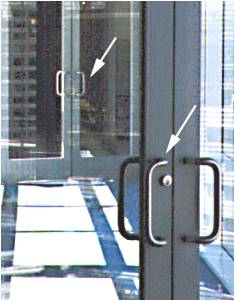
This set of doors connects a walkway between two buildings

Although both sides of both sets of
doors have handles, only the outer
handles are meant to be pulled
Using either set of doors once inside
the walkway, to exit, one needs to
push
Feel trapped??

AFFORDANCES (PHYSICAL)
Physical affordances:
How do the following physical objects afford?
Are they obvious?


AFFORDANCES (LOGICAL)
Virtual affordances (logical)
How do the following screen objects afford?
What if you were a novice user?
Would you know what to do with them?


DESIGN PRINCIPLES REVISITED

Visibility
Placing the controls in a highly visible location
Feedback
provision of information about the result of an action
Constraints
Restricting the possible actions that can be performed helps prevent user from selecting incorrect options
Mapping
Mapping is the relationship between controls and their action or effect in the world
Consistency
Internal consistency refers to designing operations to behave the same within an application
External consistency refers to designing operations, interfaces, etc., to be the same across applications and devices
Affordances
properties of an object that indicate how it can be used

Lecture 4: User Profiling

USER

“One most unfortunate product is the type of engineer who does not realize that in order to apply the fruits of science for the benefit of mankind, he must not only grasp the principles of science, but must also know the needs and aspirations, the possibilities and the frailties, of those whom he would serve.”

-- Vannevar Bush

1890-1974, well known
American Electrical engineer
Directed programs like the first development of atomic bombs , mass production of penicillin

WHAT IS USER PROFILING


The process of establishing knowledge about the users
Find out who users are: Children, Elderly, Professional, Scientist, Male, Female, Tech Savvy, IT Illiterate

what is the goal in using the product:Withdraw cash, pay bills, find out movie time, online chat, gaming, research, cook, wash, treatment

what are the tasks involved? (observe existing work practices):E.g. To apply for leave: check schedule, get leave application form from admin, fill in the form, get supervisor to approve, get manager to approve, inform scheduler, inform colleagues, go on leave.

WHY DO USER PROFILING

System will fail if it -
does not do what the user needs
is inappropriate to the user

“the system must match the users’ tasks and must meet the requirements”

Why do user profiling, why not define “good” interfaces and just based your design on them?
infinite variety of tasks and users
guidelines can be too vague to be generative
e.g., “give adequate feedback”, or “make the system enjoyable”
– how do you define and relate to users?”

WHY DO WE WANT TO KNOW-WHO ARE THE USERS

Identify attributes of users:
Physical characteristics:
height; physical abilities or disabilities
Background:
education; social; religious
Skills:
task experience
Preferences:
efficiency

WHY DO WE WANT TO KNOW-WHERE IS THE TASK PERFORMED

Office, laboratory, POS? (while standing, while sitting, in a crowded place, effects of environment)
Are users under stress? (in an operation theatre)
Is confidentiality required? (information displayed)
Do Users have wet hands? (at the butcher)
Do Users consume drinks while doing tasks?
What kind of lighting do they work under?
Surrounding noise

WHY DO WE WANT TO KNOW-RELATIONSHIP BETWEEN USER AND DATA


Personal data
always accessed at same machine?
do users move between machines?
Common data
used concurrently?
Passed sequentially between users?
Access to data restricted?


WHAT DO WE WANT TO KNOW-HOW OFTEN ARE TASKS PERFORMED

Frequent users remember more details
Infrequent users may need more help
even for simple operations
Which function is performed
most frequently?
by which users?
optimize system for these tasks will improve perception of good performance


WHAT DO WE WANT TO KNOW-WHAT ARE THE TIME CONSTRAINTS

What functions will users be in a hurry for?
Positioning of functions
Which can wait?
Is there a timing relationship between tasks?
Time out

USER REQUIREMENT

Captures the characteristics of the intended user group
Novice & Casual (clear step by step intro)
Expert & Frequent (flexible interactions, wide range of power/control, short cut keys)

Analyse the results of user profiling and identify the impact to your interface design

Know your users – always!

DATA GATHERING

What:
How do we go about determining requirements
and concluding the results

An important part of the requirement activity
and also evaluation activity

Why:
Purpose is to collect sufficient, relevant and
appropriate data to produce a set of reliable
requirements/conclusions.

DATA GATHERING TECHNIQUES

Questionnaires
A series of questions designed to elicit specific information
Can give quantitative and qualitative data
Administered at distance, no one to explain & help in answering
Advantages, disadvantages

Interviews
Involves asking someone a set of questions (often f2f)
Good for exploring issues, encourage people to respond
Advantages, disadvantages

Workshops or focus groups
Group interviews rather than one on one
Gain a consensus view and/or highlighting areas of conflicts
Facilitator is required to keep conversation on track
Has to be carefully structured, participants have to be carefully chosen
Advantages, disadvantages

Naturalistic observation
Spend time with stakeholders in their day to day tasks, observing work as it happens
Good for understanding the nature and context of the tasks
Take notes, ask question (not too many)

Variation of this - ‘Ethnography’
Observing from the ‘inside’ as a participant, full involvement
Advantages, disadvantages


Studying documentation
Good for getting background information on procedures and rules (manuals, job logs)
Advantages, disadvantages

PROBLEMS WITH DATA GATHERING


Identifying and involving stakeholders
Availability of key people
Communication between parties
Within development team (more technical)
With customer/user (less technical)
Between users (different parts of an organisation use different terminology
e.g. End of Module Report for APIIT vs Module Report for SU)
Dominance of certain stakeholders
Balancing functional and usability demands

QUESTIONNAIRE DESIGN

Keep questions short
Only ask a question if it contributes to design
Use closed questions for ease of analysis
Always pilot questionnaires/interview schedules

SUMMARY

Keep questions short
Only ask a question if it contributes to design
Use closed questions for ease of analysis
Always pilot questionnaires/interview schedules